Tekstuur
Each layer plays a recorded instrument as drifting loops, a cloud of grains, a stretched freeze or ringing strings. A vector point mixes them and wanders by itself.
Version 2.0 · free · open source
Tekstuur is Dutch for texture. It is an instrument for long, slow sound: hold a chord and it keeps changing. Strings, cello, horn, organ, glass, psaltery, vibes, reed and noise are built in, and you can send your own recordings to the FM-1.
The whole instrument is its own firmware: its own sound engine, screens and controls.
Listen
The first is a recording of the device; the others are rendered with the same sound code.
What it does
Loop
Three play heads per note, each with a loop of a different length, an octave or a fifth apart. The pattern takes hours to repeat.
Grain
A cloud of short grains around one place in the source.
Stretch
The source pulled out until it almost stands still.
Reson
The source strikes three tuned strings that ring with the note. With noise it is a wind harp, with an instrument a sitar or a bell.
Vector and evolve
Four layers mixed with one point; a corner is a layer, the middle is all of them. Evolve moves the point, the place in the source and the filter.
Space
Chorus, delay and a reverb with shimmer and freeze. 56 presets, sixteen slots for your own.
On the screen
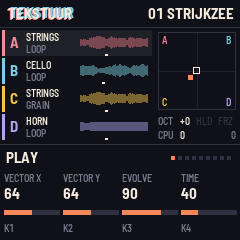
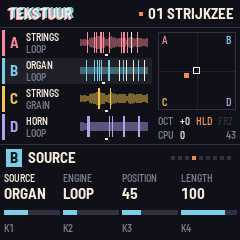
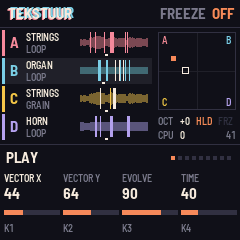
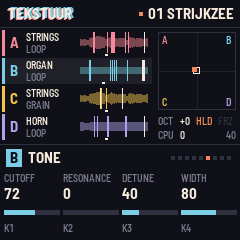
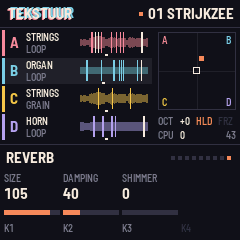
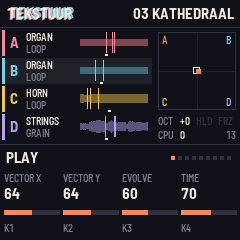
Controls
| Keys | Play, with velocity. OCT- and OCT+ shift the octave. |
| PRESET | Choose a preset: 56 built in, then your own. SAVE stores the sound. |
| SELECT, SEL | Choose layer A to D. |
| K1 to K4 | The four controls of the page. ALGORITHM steps through the pages. |
| PLAY | Hold notes: a key turns its note on, again turns it off. |
| SEQ | Freeze: the reverb keeps what is in it. |
| HOME, GLO, LFO | Play (vector, evolve, time), mix, and movement per layer. |
| EDIT, ENV, FX | Source, pitch and tone; envelope; effects and reverb. |
Getting started
Install it. Connect the FM-1 with USB, open the install page in Chrome or Edge and press Install. Your browser asks once to allow MIDI.
Play. Turn PRESET, hold a chord, turn K1 to K4.
Go further. The source explains every page, how to send your own recordings, and how to build it yourself.
Prefer a file? Download tekstuur-2.0.fwsc. Going back: the install page has a button for the stock firmware.